//cuabysynacktraa

cua

Open-source infrastructure for Computer-Use Agents. Sandboxes, SDKs, and benchmarks to train and evaluate AI agents that can control full desktops (macOS, Linux, Windows).

0
0
0
Python
Cua logo

Build and deploy AI agents that can reason, plan and act on any Computers

cua.ai Discord Twitter Documentation
trycua%2Fcua | Trendshift

undefinedCua (โ€œkoo-ahโ€) is an open-source framework for Computer-Use Agents - enabling AI systems to autonomously operate computers through visual understanding and action execution. Used for research, evaluation, and production deployment of desktop, browser, and mobile automation agents.

What are Computer-Use Agents?

Computer-Use Agents (CUAs) are AI systems that can autonomously interact with computer interfaces through visual understanding and action execution. Unlike traditional automation tools that rely on brittle selectors or APIs, CUAs use vision-language models to perceive screen content and reason about interface interactions - enabling them to adapt to UI changes and handle complex, multi-step workflows across applications.

With the Computer SDK, you can:

With the Agent SDK, you can:

  • run computer-use models with a consistent schema
  • benchmark on OSWorld-Verified (369 tasks), SheetBench-V2, and ScreenSpot with a single line of code using HUD - see benchmark results (Notebook)
  • combine UI grounding models with any LLM using composed agents
  • use new UI agent models and UI grounding models from the Model Zoo below with just a model string (e.g., ComputerAgent(model="openai/computer-use-preview"))
  • use API or local inference by changing a prefix (e.g., openai/, openrouter/, ollama/, huggingface-local/, mlx/, etc.)

Modules

undefinedAgentundefined

AI agent framework for automating tasks

undefinedComputerundefined

TypeScript/Python SDK for controlling Cua environments

undefinedMCP Serverundefined

MCP server for using Cua agents and computers

undefinedComputer Serverundefined

Server component that runs on Cua environments

undefinedLumeundefined

VM management for macOS

undefinedLumierundefined

Docker interface for macOS/Linux VMs

undefinedSOMundefined

Set-of-Mark library for Agent

undefinedCoreundefined

Core utilities for Cua

Quick Start

Python Version Compatibility

Cua packages require Python 3.12 or 3.13. Python 3.14 is not currently supported due to dependency compatibility issues (pydantic-core/PyO3 compatibility). If you encounter build errors on Python 3.14, please use Python 3.13 or earlier.

Agent SDK

Install the agent SDK:

pip install cua-agent[all]

Initialize a computer agent using a model configuration string and a computer instance:

from agent import ComputerAgent

# ComputerAgent works with any computer initialized with the Computer SDK

agent = ComputerAgent(
    model="anthropic/claude-sonnet-4-5-20250929",
    tools=[computer],
    max_trajectory_budget=5.0
)

messages = [{"role": "user", "content": "Take a screenshot and tell me what you see"}]

async for result in agent.run(messages):
    for item in result["output"]:
        if item["type"] == "message":
            print(item["content"][0]["text"])

Output format

Cua uses the OpenAI Agent response format.

Example
{
  "output": [
    {
      "role": "user",
      "content": "go to trycua on gh"
    },
    {
      "summary": [
        {
          "text": "Searching Firefox for Trycua GitHub",
          "type": "summary_text"
        }
      ],
      "type": "reasoning"
    },
    {
      "action": {
        "text": "Trycua GitHub",
        "type": "type"
      },
      "call_id": "call_QI6OsYkXxl6Ww1KvyJc4LKKq",
      "status": "completed",
      "type": "computer_call"
    },
    {
      "type": "computer_call_output",
      "call_id": "call_QI6OsYkXxl6Ww1KvyJc4LKKq",
      "output": {
        "type": "input_image",
        "image_url": "data:image/png;base64,..."
      }
    },
    {
      "type": "message",
      "role": "assistant",
      "content": [
        {
          "text": "Success! The Trycua GitHub page has been opened.",
          "type": "output_text"
        }
      ]
    }
  ],
  "usage": {
    "prompt_tokens": 150,
    "completion_tokens": 75,
    "total_tokens": 225,
    "response_cost": 0.01
  }
}

Model Configuration

These are the valid model configurations for ComputerAgent(model="..."):

Configuration Description
{computer-use-model} A single model to perform all computer-use tasks
{grounding-model}+{any-vlm-with-tools} Composed with VLM for captioning and grounding LLM for element detection
moondream3+{any-llm-with-tools} Composed with Moondream3 for captioning and UI element detection
human/human A human-in-the-loop in place of a model

Model Capabilities

The following table shows which capabilities are supported by each model:

Model Computer-Use Grounding Tools VLM Cloud
Claude Sonnet/Haiku ๐Ÿ–ฅ๏ธ ๐ŸŽฏ ๐Ÿ› ๏ธ ๐Ÿ‘๏ธ โ˜๏ธ
Claude Opus ๐Ÿ–ฅ๏ธ ๐ŸŽฏ ๐Ÿ› ๏ธ ๐Ÿ‘๏ธ โ˜๏ธ
OpenAI CU Preview ๐Ÿ–ฅ๏ธ ๐ŸŽฏ ๐Ÿ‘๏ธ
Qwen3 VL ๐Ÿ–ฅ๏ธ ๐ŸŽฏ ๐Ÿ› ๏ธ ๐Ÿ‘๏ธ โ˜๏ธ
GLM-V ๐Ÿ–ฅ๏ธ ๐ŸŽฏ ๐Ÿ› ๏ธ ๐Ÿ‘๏ธ
Gemini CU Preview ๐Ÿ–ฅ๏ธ ๐ŸŽฏ ๐Ÿ‘๏ธ
InternVL ๐Ÿ–ฅ๏ธ ๐ŸŽฏ ๐Ÿ› ๏ธ ๐Ÿ‘๏ธ
UI-TARS ๐Ÿ–ฅ๏ธ ๐ŸŽฏ ๐Ÿ› ๏ธ ๐Ÿ‘๏ธ
UI-TARS-2 ๐Ÿ–ฅ๏ธ ๐ŸŽฏ ๐Ÿ› ๏ธ ๐Ÿ‘๏ธ โ˜๏ธ
OpenCUA ๐ŸŽฏ
GTA ๐ŸŽฏ
Holo ๐ŸŽฏ
Moondream ๐ŸŽฏ
OmniParser ๐ŸŽฏ

undefinedLegend:undefined

  • ๐Ÿ–ฅ๏ธ Computer-Use: Full agentic loop with planning and execution
  • ๐ŸŽฏ Grounding: UI element detection and click coordinate prediction
  • ๐Ÿ› ๏ธ Tools: Support for function calling beyond screen interaction
  • ๐Ÿ‘๏ธ VLM: Vision-language understanding
  • โ˜๏ธ Cloud: Supported on Cua VLM

undefinedComposition Examples:undefined

See more examples on our composition docs.

# Use OpenAI's GPT-5 for planning with specialized grounding
agent = ComputerAgent(model="huggingface-local/HelloKKMe/GTA1-7B+openai/gpt-5")

# Composition via OmniParser
agent = ComputerAgent(model="omniparser+openai/gpt-4o")

# Combine state-of-the-art grounding with powerful reasoning
agent = ComputerAgent(model="huggingface-local/HelloKKMe/GTA1-7B+anthropic/claude-sonnet-4-5-20250929")

# Combine two different vision models for enhanced capabilities
agent = ComputerAgent(model="huggingface-local/ByteDance-Seed/UI-TARS-1.5-7B+openai/gpt-4o")

# Use the built-in Moondream3 grounding with any planning mode.
agent = ComputerAgent(model="moondream3+openai/gpt-4o")

Model IDs

Examples of valid model IDs
Model Model IDs
Claude Sonnet/Haiku anthropic/claude-sonnet-4-5, anthropic/claude-haiku-4-5
OpenAI CU Preview openai/computer-use-preview
GLM-V openrouter/z-ai/glm-4.5v, huggingface-local/zai-org/GLM-4.5V
Qwen3 VL openrouter/qwen/qwen3-vl-235b-a22b-instruct
Gemini CU Preview gemini-2.5-computer-use-preview
InternVL huggingface-local/OpenGVLab/InternVL3_5-{1B,2B,4B,8B,...}
UI-TARS huggingface-local/ByteDance-Seed/UI-TARS-1.5-7B
UI-TARS-2 cua/bytedance/ui-tars-2
OpenCUA huggingface-local/xlangai/OpenCUA-{7B,32B}
GTA huggingface-local/HelloKKMe/GTA1-{7B,32B,72B}
Holo huggingface-local/Hcompany/Holo1.5-{3B,7B,72B}
Moondream moondream3
OmniParser omniparser

Missing a model? Create a feature request or contribute!

Learn more in the Agent SDK documentation.

Computer SDK

Install the computer SDK:

pip install cua-computer

Initialize a computer:

from computer import Computer

computer = Computer(
    os_type="linux",  # or "macos", "windows"
    provider_type="cloud",  # or "lume", "docker", "windows_sandbox"
    name="your-sandbox-name",
    api_key="your-api-key"  # only for cloud
    # or use_host_computer_server=True for host desktop
)

try:
    await computer.run()

    # Take a screenshot
    screenshot = await computer.interface.screenshot()

    # Click and type
    await computer.interface.left_click(100, 100)
    await computer.interface.type_text("Hello!")
finally:
    await computer.close()

Learn more in the Computer SDK documentation.

MCP Server

Install the MCP server:

pip install cua-mcp-server

Learn more in the MCP Server documentation.

Computer Server

Install the Computer Server:

pip install cua-computer-server
python -m computer_server

Learn more in the Computer Server documentation.

Lume

Install Lume:

curl -fsSL https://raw.githubusercontent.com/trycua/cua/main/libs/lume/scripts/install.sh | bash

Learn more in the Lume documentation.

Lumier

Install Lumier:

docker pull trycua/lumier:latest

Learn more in the Lumier documentation.

SOM

Install SOM:

pip install cua-som

Learn more in the SOM documentation.

Recent Updates

2025

December 2025

  • undefinedCloud VLM Platform: Support for Claude Opus, Qwen3 VL 235B, and UI-TARS-2 on Cua VLM cloud infrastructure
  • undefinedQEMU Container Support: Native Linux and Windows container execution via QEMU virtualization

November 2025

  • undefinedGeneric VLM Provider: Expanded support for custom VLM providers and model configurations
  • undefinedNeurIPS 2025: Coverage of computer-use agent research papers and developments (Blog Post)

October 2025

  • undefinedAgent SDK Improvements: Enhanced model support and configuration options

September 2025

  • undefinedHack the North Competition: First benchmark-driven hackathon track with guaranteed YC interview prize. Winner achieved 68.3% on OSWorld-Tiny (Blog Post)
  • undefinedGlobal Hackathon Launch: Ollama ร— Cua global online competition for creative local/hybrid agents

August 2025

  • undefinedv0.4 Release - Composite Agents: Mix grounding + planning models with + operator (e.g., "GTA-7B+GPT-4o") (Blog Post)
  • undefinedHUD Integration: One-line benchmarking on OSWorld-Verified with live trace visualization (Blog Post)
  • undefinedHuman-in-the-Loop: Interactive agent mode with human/human model string
  • undefinedWeb-Based Computer Use: Browser-based agent execution (Blog Post)

June 2025

  • undefinedWindows Sandbox Support: Native Windows agent execution (Blog Post)
  • undefinedContainerization Evolution: From Lume to full Docker support (Blog Post)
  • undefinedSandboxed Python Execution: Secure code execution in agent workflows

May 2025

  • undefinedCua Cloud Containers: Production-ready cloud deployment with elastic scaling (Blog Post)
  • undefinedTrajectory Viewer: Visual debugging tool for agent actions (Blog Post)
  • undefinedTraining Data Collection: Tools for creating computer-use training datasets (Blog Post)
  • undefinedApp-Use Framework: Mobile and desktop app automation capabilities

April 2025

  • undefinedAgent Framework v0.4: Unified API for 100+ model configurations
  • undefinedUI-TARS Integration: Local inference support for ByteDanceโ€™s desktop-optimized model
  • undefinedBlog Series: โ€œBuild Your Own Operatorโ€ tutorials (Part 1 | Part 2)

March 2025

  • undefinedInitial Public Release: Core Agent SDK and Computer SDK
  • undefinedLume VM Manager: macOS VM management tool for local development

Resources

Community and Contributions

We welcome contributions to Cua! Please refer to our Contributing Guidelines for details.

Join our Discord community to discuss ideas, get assistance, or share your demos!

License

Cua is open-sourced under the MIT License - see the LICENSE file for details.

Portions of this project, specifically components adapted from Kasm Technologies Inc., are also licensed under the MIT License. See libs/kasm/LICENSE for details.

Microsoftโ€™s OmniParser, which is used in this project, is licensed under the Creative Commons Attribution 4.0 International License (CC-BY-4.0). See the OmniParser LICENSE for details.

Third-Party Licenses and Optional Components

Some optional extras for this project depend on third-party packages that are licensed under terms different from the MIT License.

  • The optional โ€œomniโ€ extra (installed via pip install "cua-agent[omni]") installs the cua-som module, which includes ultralytics and is licensed under the AGPL-3.0.

When you choose to install and use such optional extras, your use, modification, and distribution of those third-party components are governed by their respective licenses (e.g., AGPL-3.0 for ultralytics).

Trademarks

Apple, macOS, and Apple Silicon are trademarks of Apple Inc.
Ubuntu and Canonical are registered trademarks of Canonical Ltd.
Microsoft is a registered trademark of Microsoft Corporation.

This project is not affiliated with, endorsed by, or sponsored by Apple Inc., Canonical Ltd., Microsoft Corporation, or Kasm Technologies.

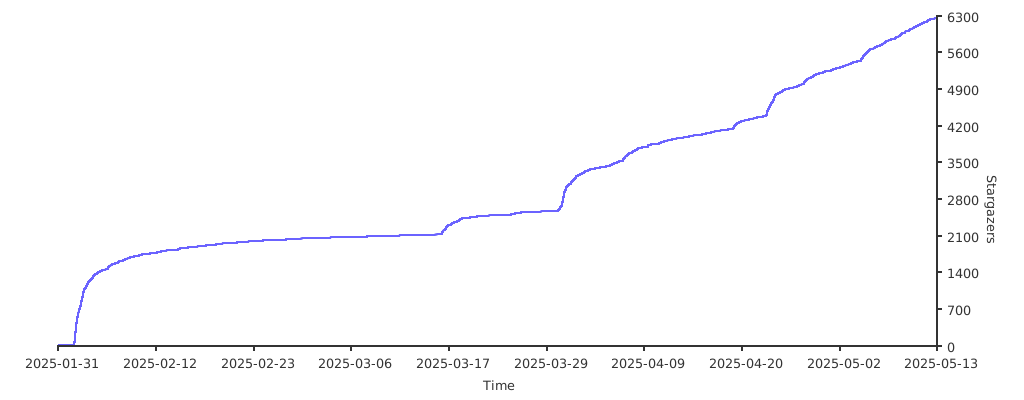
Stargazers

Thank you to all our supporters!

Stargazers over time

Sponsors

Thank you to all our GitHub Sponsors!

coderabbit-cli
[beta]v0.14.0