shapash
🔅 Shapash: User-friendly Explainability and Interpretability to Develop Reliable and Transparent Machine Learning Models






🎉 What’s new ?
| Version | New Feature | Description | Tutorial |
|---|---|---|---|
| 2.3.x | Additional dataset columns New demo Article |
In Webapp: Target and error columns added to dataset and possibility to add features outside the model for more filtering options |  |
| 2.3.x | Identity card New demo Article |
In Webapp: New identity card to summarize the information of the selected sample |  |
| 2.2.x | Picking samples Article |
New tab in the webapp for picking samples. The graph represents the “True Values Vs Predicted Values” |  |
| 2.2.x | Dataset Filter |
New tab in the webapp to filter data. And several improvements in the webapp: subtitles, labels, screen adjustments |  |
| 2.0.x | Refactoring Shapash |
Refactoring attributes of compile methods and init. Refactoring implementation for new backends |  |
| 1.7.x | Variabilize Colors |
Giving possibility to have your own colour palette for outputs adapted to your design |  |
| 1.6.x | Explainability Quality Metrics Article |
To help increase confidence in explainability methods, you can evaluate the relevance of your explainability using 3 metrics: Stability, Consistency and Compacity |  |
| 1.5.x | ACV Backend |
A new way of estimating Shapley values using ACV. More info about ACV here. |  |
| 1.4.x | Groups of features Demo |
You can now regroup features that share common properties together. This option can be useful if your model has a lot of features. |
 |
| 1.3.x | Shapash Report Demo |
A standalone HTML report that constitutes a basis of an audit document. |  |
🔍 Overview
Shapash is a Python library which aims to make machine learning interpretable and understandable by everyone.
It provides several types of visualization that display explicit labels that everyone can understand.
Data Scientists can understand their models easily and share their results. End users can understand the decision proposed by a model using a summary of the most influential criteria.
Shapash also contributes to data science auditing by displaying usefull information about any model and data in a unique report.
- Readthedocs:
- Presentation video for french speakers
- Medium:
- Understand your model with Shapash - Towards AI
- Model auditability - Towards DS
- Group of features - Towards AI
- Building confidence on explainability - Towards DS
- Picking Examples to Understand Machine Learning Model
- Enhancing Webapp Built-In Features for Comprehensive Machine Learning Model Interpretation
🤝 Contributors


🏆 Awards


🔥 Features
- Display clear and understandable results: plots and outputs use explicit labels for each feature and its values



-
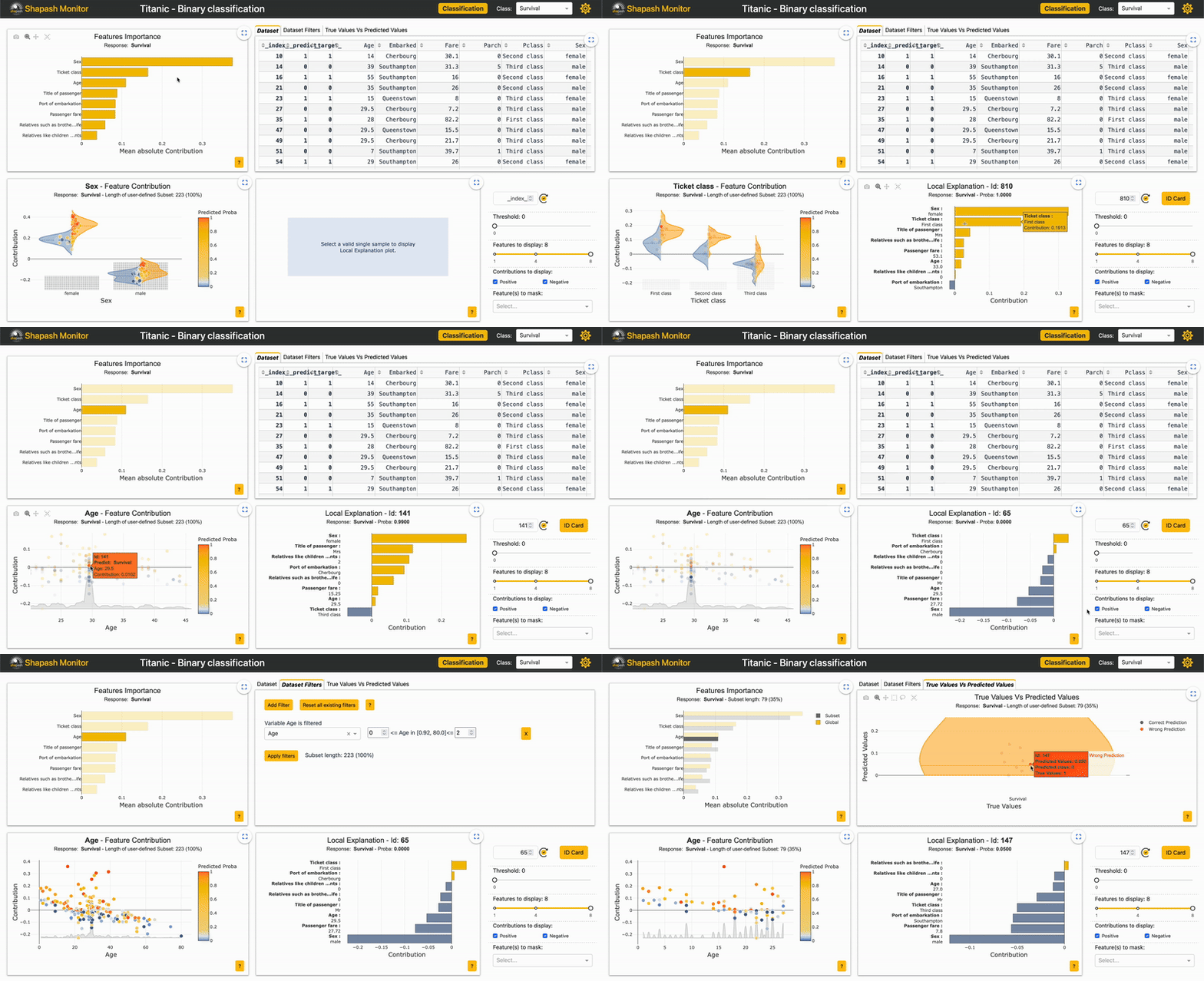
Allow Data Scientists to quickly understand their models by using a webapp to easily navigate between global and local explainability, and understand how the different features contribute: Live Demo Shapash-Monitor
-
Summarize and export the local explanation
Shapash proposes a short and clear local explanation. It allows each user, whatever their Data background, to understand a local prediction of a supervised model thanks to a summarized and explicit explanation
-
Evaluate the quality of your explainability using different metrics
-
Easily share and discuss results with non-Data users
-
Select subsets for further analysis of explainability by filtering on explanatory and additional features, correct or wrong predictions. Picking Examples to Understand Machine Learning Model
-
Deploy interpretability part of your project: From model training to deployment (API or Batch Mode)
-
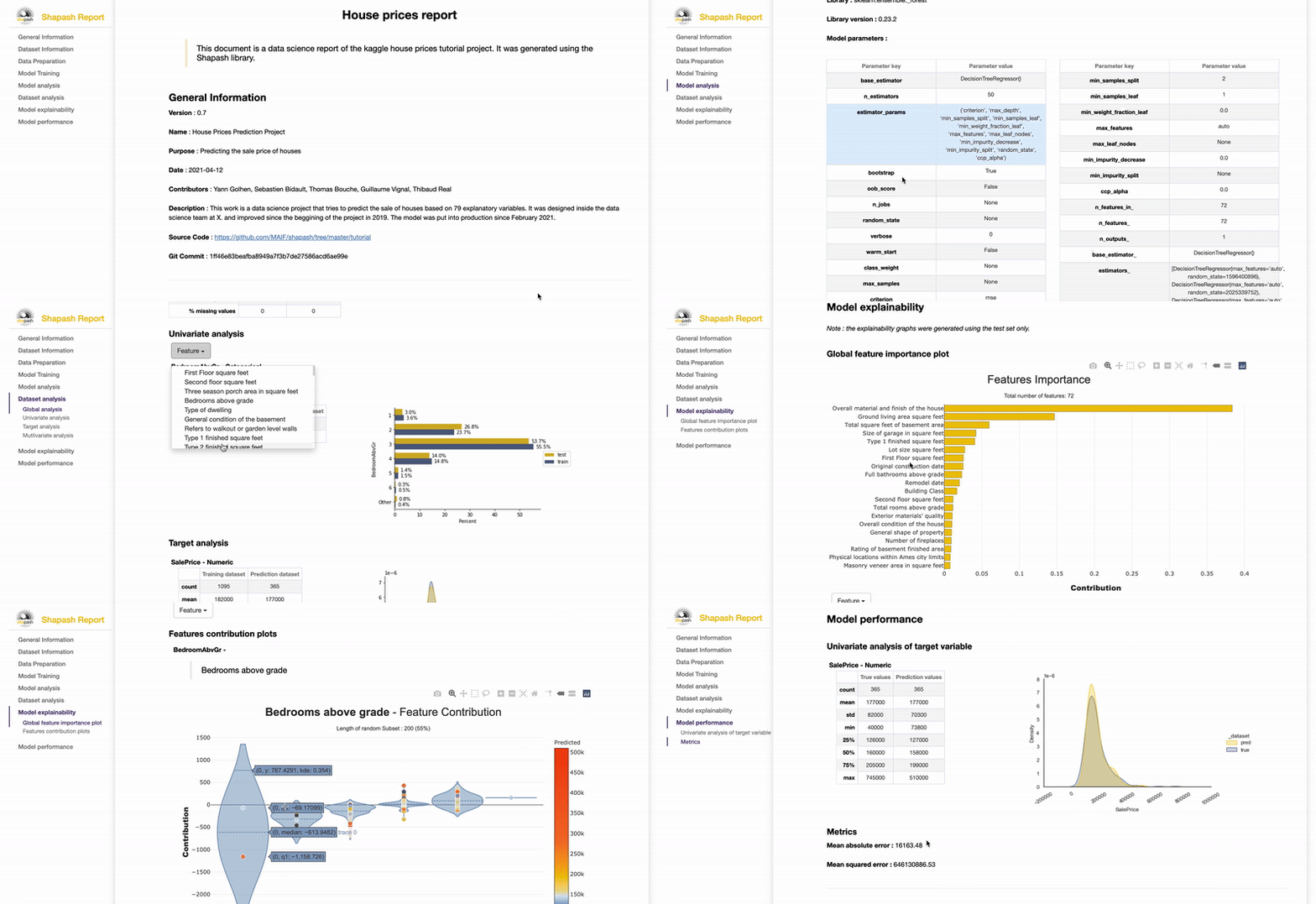
Contribute to the auditability of your model by generating a standalone HTML report of your projects. Report Example
We hope that this report will bring a valuable support to auditing models and data related to a better AI governance.
Data Scientists can now deliver to anyone who is interested in their project a document that freezes different aspects of their work as a basis of an audit report.
This document can be easily shared across teams (internal audit, DPO, risk, compliance…).
⚙️ How Shapash works
Shapash is an overlay package for libraries dedicated to the interpretability of models. It uses Shap or Lime backend
to compute contributions.
Shapash builds on the different steps necessary to build a machine learning model to make the results understandable
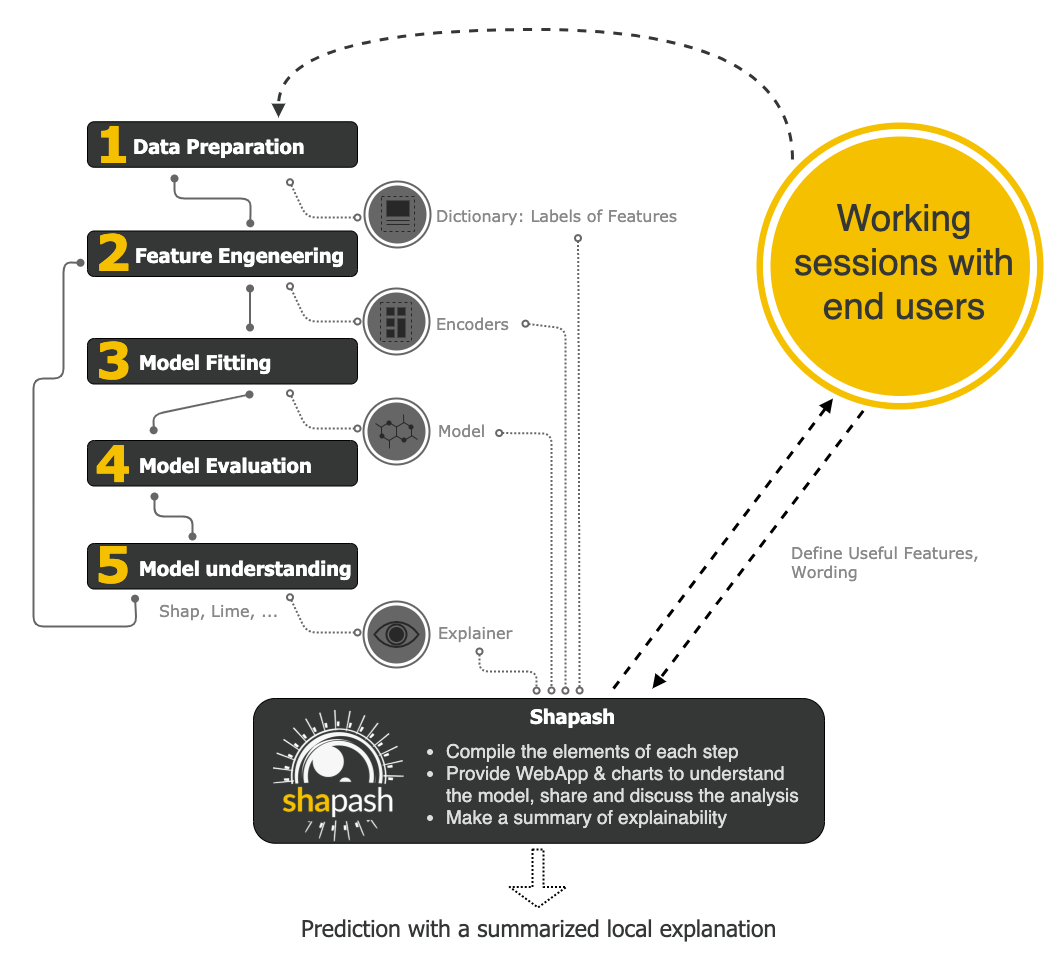
Shapash works for Regression, Binary Classification or Multiclass problem.
It is compatible with many models: Catboost, Xgboost, LightGBM, Sklearn Ensemble, Linear models, SVM.
Shapash can use category-encoders object, sklearn ColumnTransformer or simply features dictionary.
- Category_encoder: OneHotEncoder, OrdinalEncoder, BaseNEncoder, BinaryEncoder, TargetEncoder
- Sklearn ColumnTransformer: OneHotEncoder, OrdinalEncoder, StandardScaler, QuantileTransformer, PowerTransformer
🛠 Installation
Shapash is intended to work with Python versions 3.8 to 3.10. Installation can be done with pip:
pip install shapash
In order to generate the Shapash Report some extra requirements are needed.
You can install these using the following command :
pip install shapash[report]
If you encounter compatibility issues you may check the corresponding section in the Shapash documentation here.
🕐 Quickstart
The 4 steps to display results:
- Step 1: Declare SmartExplainer Object
There 1 mandatory parameter in compile method: Model
You can declare features dict here to specify the labels to display
from shapash import SmartExplainer
xpl = SmartExplainer(
  model=regressor,
  features_dict=house_dict,  # Optional parameter
  preprocessing=encoder, # Optional: compile step can use inverse_transform method
  postprocessing=postprocess, # Optional: see tutorial postprocessing
)
- Step 2: Compile Dataset, …
There 1 mandatory parameter in compile method: Dataset
xpl.compile(
    x=Xtest,
    y_pred=y_pred, # Optional: for your own prediction (by default: model.predict)
    y_target=yTest, # Optional: allows to display True Values vs Predicted Values
    additional_data=X_additional, # Optional: additional dataset of features for Webapp
    additional_features_dict=features_dict_additional, # Optional: dict additional data
)
- Step 3: Display output
There are several outputs and plots available. for example, you can launch the web app:
app = xpl.run_app()
- Step 4: Generate the Shapash Report
This step allows to generate a standalone html report of your project using the different splits
of your dataset and also the metrics you used:
xpl.generate_report(
    output_file='path/to/output/report.html',
    project_info_file='path/to/project_info.yml',
    x_train=Xtrain,
    y_train=ytrain,
    y_test=ytest,
    title_story="House prices report",
    title_description="""This document is a data science report of the kaggle house prices tutorial project.
        It was generated using the Shapash library.""",
    metrics=[{'name': 'MSE', 'path': 'sklearn.metrics.mean_squared_error'}]
)
- Step 5: From training to deployment : SmartPredictor Object
Shapash provides a SmartPredictor object to deploy the summary of local explanation for the operational needs.
It is an object dedicated to deployment, lighter than SmartExplainer with additional consistency checks.
SmartPredictor can be used with an API or in batch mode. It provides predictions, detailed or summarized local
explainability using appropriate wording.
predictor = xpl.to_smartpredictor()
See the tutorial part to know how to use the SmartPredictor object
📖 Tutorials
This github repository offers many tutorials to allow you to easily get started with Shapash.
Overview
Charts and plots
- Shapash Features Importance
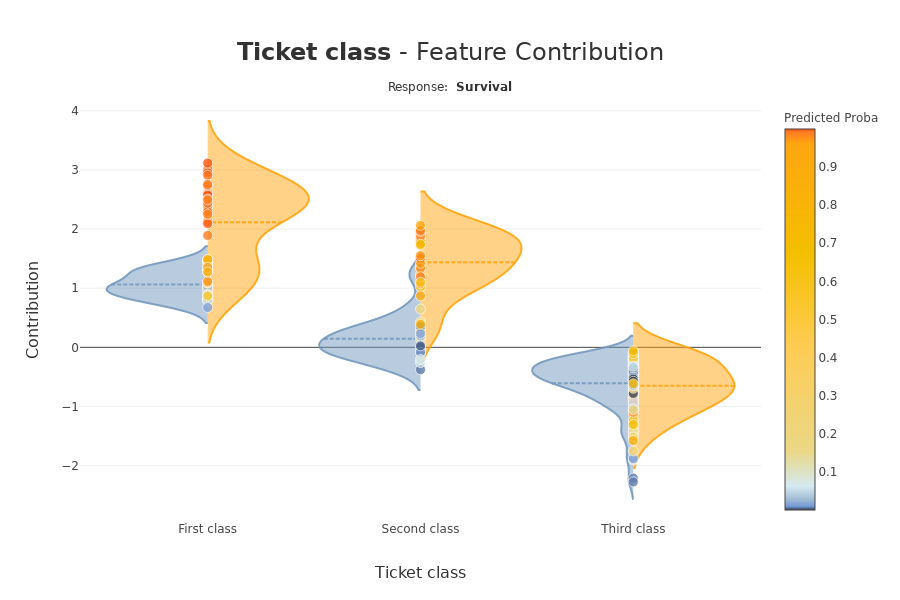
- Contribution plot to understand how one feature affects a prediction
- Summarize, display and export local contribution using filter and local_plot method
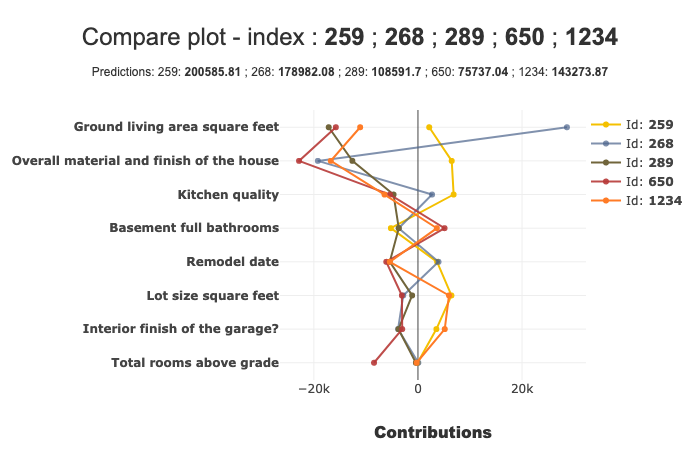
- Contributions Comparing plot to understand why predictions on several individuals are different
- Visualize interactions between couple of variables
- Display True Values Vs Predicted Values
- Customize colors in Webapp, plots and report
Different ways to use Encoders and Dictionaries
Displaying data with postprocessing
Using different backends
- Compute Shapley Contributions using Shap
- Use Lime to compute local explanation, Summarize-it with Shapash
- Use ACV backend to compute Active Shapley Values and SDP global importance
- Compile faster Lime and consistency of contributions
- Use FastTreeSHAP or add contributions from another backend
- Use Class Shapash Backend