size-limit
Calculate the real cost to run your JS app or lib to keep good performance. Show error in pull request if the cost exceeds the limit.
Size Limit
Size Limit is a performance budget tool for JavaScript. It checks every commit
on CI, calculates the real cost of your JS for end-users and throws an error
if the cost exceeds the limit.
- ES modules and tree-shaking support.
- Add Size Limit to GitHub Actions, Circle CI or another CI system
to know if a pull request adds a massive dependency. - Modular to fit different use cases: big JS applications
that use their own bundler or small npm libraries with many files. - Can calculate the time it would take a browser
to download and execute your JS. Time is a much more accurate
and understandable metric compared to the size in bytes.
Additionally, you can customize time plugin via config
for every check with network speed, latency and so on. - Calculations include all dependencies and polyfills
used in your JS.

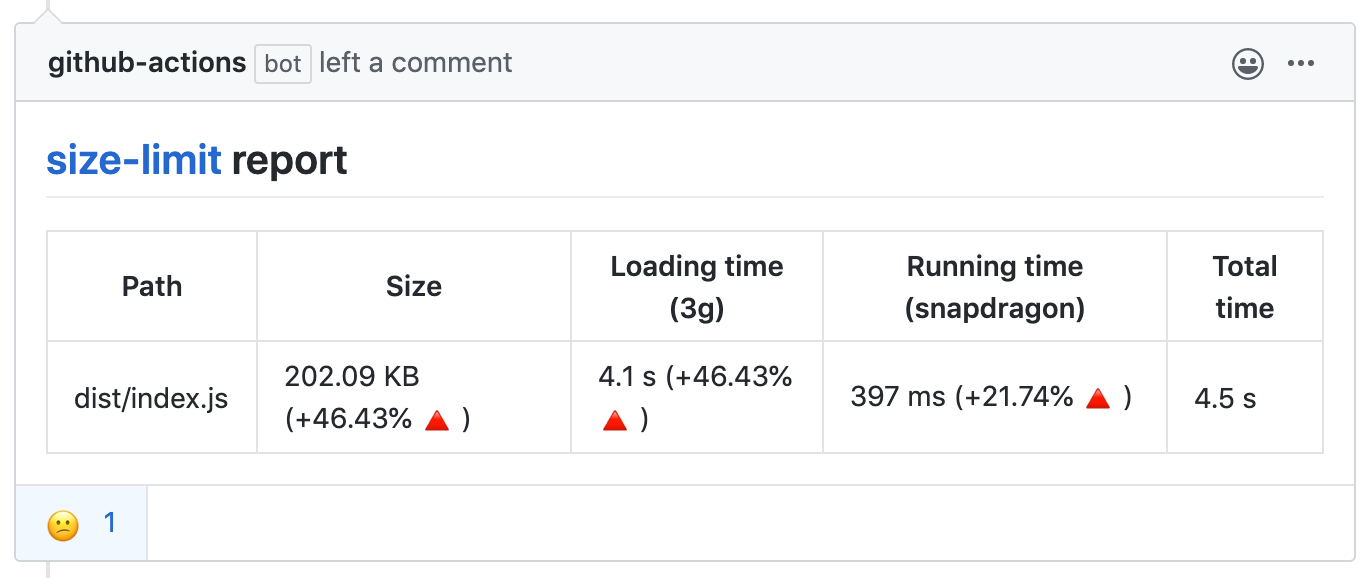
With GitHub action Size Limit will post bundle size changes as a comment
in pull request discussion.
With --why, Size Limit can tell you why your library is of this size
and show the real cost of all your internal dependencies.
We are using Statoscope for this analysis.

 Size Limit is built by Evil Martians, an American design and engineering consultancy for developer tools, AI, and cybersecurity startups.
Who Uses Size Limit
- MobX
- Material-UI
- Ant Design
- Autoprefixer
- PostCSS reduced
25% of the size. - Browserslist reduced
25% of the size. - EmojiMart reduced
20% of the size - nanoid reduced
33% of the size. - React Focus Lock reduced
32% of the size. - Logux reduced
90% of the size.
How It Works
- Size Limit contains a CLI tool, 3 plugins (
file,webpack,time)
and 3 plugin presets for popular use cases (app,big-lib,small-lib).
A CLI tool finds plugins inpackage.jsonand loads the config. - If you use the
webpackplugin, Size Limit will bundle your JS files into
a single file. It is important to track dependencies and webpack polyfills.
It is also useful for small libraries with many small files and without
a bundler. - The
webpackplugin creates an empty webpack project, adds your library
and looks for the bundle size difference. - The
timeplugin compares the current machine performance with that of
a low-priced Android devices to calculate the CPU throttling rate. - Then the
timeplugin runs headless Chrome (or desktop Chrome if it’s
available) to track the time a browser takes to compile and execute your JS.
Note that these measurements depend on available resources and might
be unstable. See here
for more details.
Usage
JS Applications
Suitable for applications that have their own bundler and send the JS bundle
directly to a client (without publishing it to npm). Think of a user-facing app
or website, like an email client, a CRM, a landing page or a blog with
interactive elements, using React/Vue/Svelte lib or vanilla JS.
Show instructions
-
Install the preset:
npm install --save-dev size-limit @size-limit/file -
Add the
size-limitsection and thesizescript to yourpackage.json:+ "size-limit": [ + { + "path": "dist/app-*.js" + } + ], "scripts": { "build": "webpack ./webpack.config.js", + "size": "npm run build && size-limit", "test": "vitest && eslint ." } -
Here’s how you can get the size for your current project:
$ npm run size Package size: 30.08 kB with all dependencies, minified and brotlied -
Now, let’s set the limit. Add 25% to the current total size and use that as
the limit in yourpackage.json:"size-limit": [ { + "limit": "35 kB", "path": "dist/app-*.js" } ], -
Add the
sizescript to your test suite:"scripts": { "build": "webpack ./webpack.config.js", "size": "npm run build && size-limit", - "test": "vitest && eslint ." + "test": "vitest && eslint . && npm run size" } -
If you don’t have a continuous integration service running, don’t forget
to add one — start with GitHub Actions.
JS Application and Time-based Limit
File size limit (in kB) is not the best way to describe your JS application
cost for developers. Developers will compare the size of the JS bundle
with the size of images. But browsers need much more time to parse 100 kB
of JS than 100 kB of an image since JS compilers are very complex.
This is why Size Limit support time-based limit. It runs headless Chrome
to track the time a browser takes to compile and execute your JS.
Show instructions
-
Install the preset:
npm install --save-dev size-limit @size-limit/preset-app -
Add the
size-limitsection and thesizescript to yourpackage.json:+ "size-limit": [ + { + "path": "dist/app-*.js" + } + ], "scripts": { "build": "webpack ./webpack.config.js", + "size": "npm run build && size-limit", "test": "vitest && eslint ." } -
Here’s how you can get the size for your current project:
$ npm run size Package size: 30.08 kB with all dependencies, minified and brotlied Loading time: 602 ms on slow 3G Running time: 214 ms on Snapdragon 410 Total time: 815 ms -
Now, let’s set the limit. Add 25% to the current total time and use that as
the limit in yourpackage.json:"size-limit": [ { + "limit": "1 s", "path": "dist/app-*.js" } ], -
Add the
sizescript to your test suite:"scripts": { "build": "webpack ./webpack.config.js", "size": "npm run build && size-limit", - "test": "vitest && eslint ." + "test": "vitest && eslint . && npm run size" } -
If you don’t have a continuous integration service running, don’t forget
to add one — start with GitHub Actions.
Big Libraries
JS libraries > 10 kB in size.
This preset includes headless Chrome, and will measure your lib’s execution
time. You likely don’t need this overhead for a small 2 kB lib, but for larger
ones the execution time is a more accurate and understandable metric that
the size in bytes. Libraries like React are good examples for this preset.
Show instructions
-
Install preset:
npm install --save-dev size-limit @size-limit/preset-big-lib -
Add the
size-limitsection and thesizescript to yourpackage.json:+ "size-limit": [ + { + "path": "dist/react.production-*.js" + } + ], "scripts": { "build": "webpack ./scripts/rollup/build.js", + "size": "npm run build && size-limit", "test": "vitest && eslint ." } -
If you use ES modules you can test the size after tree-shaking with
import
option:"size-limit": [ { "path": "dist/react.production-*.js", + "import": "{ createComponent }" } ], -
Here’s how you can get the size for your current project:
$ npm run size Package size: 30.08 kB with all dependencies, minified and brotlied Loading time: 602 ms on slow 3G Running time: 214 ms on Snapdragon 410 Total time: 815 ms -
Now, let’s set the limit. Add 25% to the current total time and use that
as the limit in yourpackage.json:"size-limit": [ { + "limit": "1 s", "path": "dist/react.production-*.js" } ], -
Add a
sizescript to your test suite:"scripts": { "build": "rollup ./scripts/rollup/build.js", "size": "npm run build && size-limit", - "test": "vitest && eslint ." + "test": "vitest && eslint . && npm run size" } -
If you don’t have a continuous integration service running, don’t forget
to add one — start with GitHub Actions. -
Add the library size to docs, it will help users to choose your project:
  # Project Name

  Short project description

  * **Fast.** 10% faster than competitor.
+ * **Small.** 15 kB (minified and brotlied).
+   [Size Limit](https://github.com/ai/size-limit) controls the size.
Small Libraries
JS libraries < 10 kB in size.
This preset will only measure the size, without the execution time, so it’s
suitable for small libraries. If your library is larger, you likely want
the Big Libraries preset above. Nano ID or Storeon are good examples
for this preset.
Show instructions
-
First, install
size-limit:npm install --save-dev size-limit @size-limit/preset-small-lib -
Add the
size-limitsection and thesizescript to yourpackage.json:+ "size-limit": [ + { + "path": "index.js" + } + ], "scripts": { + "size": "size-limit", "test": "vitest && eslint ." } -
Here’s how you can get the size for your current project:
$ npm run size Package size: 177 B with all dependencies, minified and brotlied -
If your project size starts to look bloated, run
--whyfor analysis:npm run size -- --whyWe use Statoscope as bundle analyzer.
-
Now, let’s set the limit. Determine the current size of your library,
add just a little bit (a kilobyte, maybe) and use that as the limit
in yourpackage.json:"size-limit": [ { + "limit": "9 kB", "path": "index.js" } ], -
Add the
sizescript to your test suite:"scripts": { "size": "size-limit", - "test": "vitest && eslint ." + "test": "vitest && eslint . && npm run size" } -
If you don’t have a continuous integration service running, don’t forget
to add one — start with GitHub Actions. -
Add the library size to docs, it will help users to choose your project:
  # Project Name

  Short project description

  * **Fast.** 10% faster than competitor.
+ * **Small.** 500 bytes (minified and brotlied). No dependencies.
+   [Size Limit](https://github.com/ai/size-limit) controls the size.
Reports
Size Limit has a GitHub action that comments and rejects pull requests based
on Size Limit output.
- Install and configure Size Limit as shown above.
- Add the following action inside
.github/workflows/size-limit.yml
name: 'size'
on:
  pull_request:
    branches:
      - master
jobs:
  size:
    runs-on: ubuntu-latest
    env:
      CI_JOB_NUMBER: 1
    steps:
      - uses: actions/checkout@v1
      - uses: andresz1/size-limit-action@v1
        with:
          github_token: ${{ secrets.GITHUB_TOKEN }}
Config
Plugins and Presets
Plugins or plugin presets will be loaded automatically from package.json.
For example, if you want to use @size-limit/webpack, you can just use
npm install --save-dev @size-limit/webpack, or you can use our preset
@size-limit/preset-big-lib.
Plugins:
@size-limit/filechecks the size of files with Brotli (default), Gzip
or without compression.@size-limit/webpackadds your library to empty webpack project
and prepares bundle file forfileplugin.@size-limit/webpack-whyadds reports forwebpackplugin
about your library is of this size to show the cost of all your
dependencies.@size-limit/webpack-cssadds css support forwebpackplugin.@size-limit/esbuildis likewebpackplugin, but usesesbuild
to be faster and use less space innode_modules.@size-limit/esbuild-whyadd reports foresbuildplugin
about your library is of this size to show the cost of all your
dependencies.@size-limit/timeuses headless Chrome to track time to execute JS.
Plugin presets:
@size-limit/preset-appcontainsfileandtimeplugins.@size-limit/preset-big-libcontainswebpack,file, andtimeplugins.@size-limit/preset-small-libcontainsesbuildandfileplugins.
Third-Party Plugins
Third-party plugins and presets named starting with size-limit- are also supported.
For example:
size-limit-node-esbuild
is like@size-limit/esbuildbut for Node libraries.size-limit-preset-node-lib
is like@size-limit/preset-small-libbut for Node libraries which contains
abovenode-esbuildand corefileplugins.nx-size-limit
is an NX build system community plugin.
Limits Config
Size Limits supports three ways to define limits config.
-
size-limitsection inpackage.json:"size-limit": [ { "path": "index.js", "import": "{ createStore }", "limit": "500 ms" } ] -
or a separate
.size-limit.jsonconfig file:;[ { path: 'index.js', import: '{ createStore }', limit: '500 ms' } ] -
or a more flexible
.size-limit.jsor.size-limit.cjsconfig file:module.exports = [ { path: 'index.js', import: '{ createStore }', limit: '500 ms' } ] -
or types
.size-limit.ts:import type { SizeLimitConfig } from '../../packages/size-limit' module.exports = [ { path: 'index.js', import: '{ createStore }', limit: '500 ms' } ] satisfies SizeLimitConfig
Each section in the config can have these options:
- path: relative paths to files. The only mandatory option.
It could be a path"index.js", a pattern"dist/app-*.js"
or an array["index.js", "dist/app-*.js", "!dist/app-exclude.js"]. - import: partial import to test tree-shaking. It could be
"{ lib }"
to testimport { lib } from 'lib',*to test all exports,
or{ "a.js": "{ a }", "b.js": "{ b }" }to test multiple files. - limit: size or time limit for files from the
pathoption. It should be
a string with a number and unit, separated by a space.
Format:100 B,10 kB,500 ms,1 s. - name: the name of the current section. It will only be useful
if you have multiple sections. - message: an optional custom message to display additional information,
such as guidance for resolving errors, relevant links, or instructions
for next steps when a limit is exceeded. - entry: when using a custom webpack config, a webpack entry could be given.
It could be a string or an array of strings.
By default, the total size of all entry points will be checked. - webpack: with
falseit will disable webpack. - running: with
falseit will disable calculating running time. - gzip: with
trueit will use Gzip compression and disable
Brotli compression. - brotli: with
falseit will disable any compression. - config: a path to a custom webpack or esbuild config.
- ignore: an array of files and dependencies to exclude from
the project size calculation. - modifyWebpackConfig: (.size-limit.js only) function that can be used
to do last-minute changes to the webpack config, like adding a plugin. - modifyEsbuildConfig: (.size-limit.js only) function that can be used
to do last-minute changes to the webpack config, like adding a plugin. - compareWith: path to
stats.jsonfrom another build to compare
(when--whyis using). - uiReports: custom UI reports list (see Statoscope docs).
- disablePlugins: npm package names of plugins to skip
for this check. For example:"@size-limit/webpack","@size-limit/esbuild",
or"@size-limit/time".
If you use Size Limit to track the size of CSS files, make sure to set
webpack: false. Otherwise, you will get wrong numbers, because webpack
inserts style-loader runtime (≈2 kB) into the bundle.
Also, you avoid having a config and pass the limit to CLI:
npm install --save-dev @size-limit/file
npx size-limit --limit "10 kB" dist/bundle.js
Additionally, you can specify a custom path to your configuration file when running the CLI:
npx size-limit --config configs/size-limit.json
Analyze with --why
You can run size-limit --why to analyze the bundle.
You will need to install @size-limit/esbuild-why or @size-limit/webpack-why
depends on which bundler you are using (default is esbuild).
For @size-limit/esbuild-why,
it will generate a esbuild-why.html at the current directory & open it in the browser.
If you also specify --save-bundle <DIR>,
the report will be generated inside <DIR>.
If you have multiple sections in your config,
the files will be named esbuild-why-{n}.html,
or you can give it a custom name:
[
  {
    "name": "cjs"
    /* snap */
  },
  {
    "name": "esm"
    /* snap */
  }
]
This will produce esbuild-why-cjs.html and esbuild-why-esm.html respectively.
For @size-limit/webpack-why,
it will generate the report and open it in the browser automatically.
JS API
const sizeLimit = require('size-limit')
const filePlugin = require('@size-limit/file')
const webpackPlugin = require('@size-limit/webpack')

sizeLimit([filePlugin, webpackPlugin], [filePath]).then(result => {
  result //=> { size: 12480 }
})