Vira_Matrix_Library
Advanced 8x8 LED Matrix Library for ESP8266/ESP32 with Emoji, Font Rendering, WebSocket Control and Animation Engine




🚀 Vira_Matrix_Library
Advanced 8x8 LED Matrix Library for ESP8266 / ESP32
⚡ Emoji Engine • 🔤 Font Rendering • 🌐 WebSocket Control • 🎞 Animation System
Developed by Mostafa Mir Mosavi T.me/ViraEP
🌐 YouTube • 💬 Telegram Channel • 📱 Instagram
⚡ Real-time LED control • 🎨 Web drawing UI • 😃 Emoji animations • 🧠 Smart scrolling engine
📌 Overview
Vira_Matrix_Library is a lightweight yet powerful Arduino library designed for controlling 8x8 LED matrix displays on ESP8266 and ESP32 platforms.
It transforms a simple LED matrix into a real-time interactive display system with animation, text rendering, and WebSocket control.
✨ Key Features
🎭 Emoji Animation Engine
Smooth built-in animated emojis (smile, heart, spinner, eye movement, etc.)
🔤 5x7 Font System
English font + partial Persian/Arabic support
🌐 Real-time WebSocket Control
Instant communication between browser and ESP device
✏️ Web Drawing Interface
Draw directly on LED matrix from browser or mobile
🌀 Scrolling Text Engine
Optimized smooth text animation system
⚙️ Design Philosophy
This library is optimized for ESP8266 memory constraints while keeping:
- ⚡ High refresh performance for LED scanning
- 🧠 Minimal RAM usage
- 🧩 Clean and scalable API design
- 🚀 Ready for future multi-matrix expansion
✨ Features
- 🎮 8x8 LED Matrix control (74HC595 compatible)
- 😊 Built-in emoji animation engine
- 🔤 5x7 pixel font rendering system
- 🌀 Smooth scrolling text engine
- 🌐 WebSocket real-time control
- ✏️ Browser-based drawing interface
- ⚡ Lightweight & fast execution
- 🔧 Scalable architecture (future width/height support)
📦 Installation
Arduino IDE
Method 1 (Manual)
- Download or clone this repository
- Copy folder to:
Documents/Arduino/libraries/
Method 2 (ZIP Import)
Sketch → Include Library → Add .ZIP Library
⚙️ Basic Example Configuration
Before uploading the example to your ESP8266 / ESP32, you MUST configure your WiFi credentials.
🌐 WiFi Settings
Replace these values with your own network information:
const char* ssid = "WiFi-SSID";
const char* password = "WiFi-PASS";
📌 What to do?
🔹 “WiFi-SSID” → Your WiFi network name (router name)
🔹 “WiFi-PASS” → Your WiFi password
⚠️ Without correct WiFi settings, the device will NOT connect to the network and WebSocket control will not work.
🧠 Matrix Initialization
This line defines how your LED matrix is connected:
ViraMatrix matrix(14, 13, 12, 8, 8);
📌 What does it mean?
ViraMatrix(matrixClockPin, matrixDataPin, matrixLatchPin, width, height);
🔧 Parameters:
14 → Clock pin (CLK)
13 → Data pin (DIO)
12 → Latch pin (STB)
8 → Matrix width (columns)
8 → Matrix height (rows)
⚙️ Important Notes
✔ Pins must match your hardware wiring
✔ Default setup is for 8x8 LED matrix
✔ Width/Height are reserved for future multi-matrix expansion
✔ Wrong pin setup = blank display or flickering
💡 Tip: If you are using different GPIO pins, only change the first 3 values.
#include "Vira_Matrix.h"

ViraMatrix matrix(14, 13, 12, 8, 8);

const char* ssid = "WiFi-SSID";
const char* password = "WiFi-PASS";

void setup() {
  matrix.begin();
}

void loop() {
  matrix.setPixel(3, 3, true);
  matrix.refresh();
}
😊 Emoji Animation Example
runSmileAnimation();
matrix.refresh();
🌐 Web Control Example (ESP8266)
Upload this example from the library:
examples/BasicDisplay/BasicDisplay.ino
Then open in browser:
http://< device-ip >
🎛 Web Features
- 🎨 Pixel drawing directly in browser
- 💬 Send text to LED matrix
- 🎞 Run animations (smile, heart, spinner, etc.)
- ⚡ Real-time updates via WebSocket
🧠 Architecture Notes
- Designed for 8x8 LED matrix systems
- Frame buffer is fixed-size (optimized for speed)
- Width/height parameters reserved for future expansion
- Fully optimized for ESP8266 memory limitations
📁 Project Structure
Vira_Matrix_Library/
│
├── src/
│ ├── Vira_Matrix.cpp
│ ├── Vira_Matrix.h
│ ├── Vira_Emoji.cpp
│ ├── Vira_Emoji.h
│ ├── Vira_Font5x7.h
│ ├── Vira_Utils.h
│
├── examples/
│ └── BasicDisplay/
│
├── library.properties
├── README.md
├── LICENSE
🎬 Live Demo
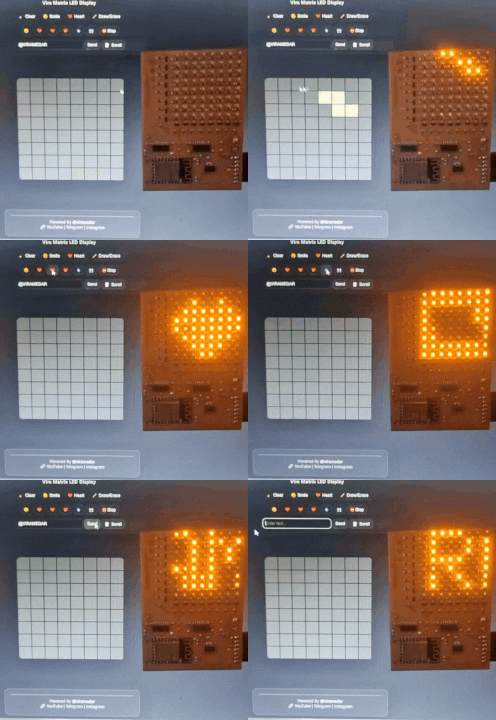
⚡ Real-time ESP8266 LED Matrix Control
🎨 Pixel Drawing • 💬 Text Control • 🎞 Animations • ⚡ WebSocket Live Sync
👨💻 Author
Mostafa Mir Mosavi (@viramedar)
- GitHub: https://github.com/admin3314
- YouTube: https://youtube.com/@viramedar
- Instagram: https://instagram.com/viramedar
- Telegram Channel: https://t.me/viramedar
- Personal Telegram: https://t.me/viraep
📚 Tutorials & Files
- 📺 Full tutorials: https://youtube.com/@viramedar
- 📦 PCB, schematics, and project files available on Telegram : T.me/ViraMedar
⚠️ Notes
- Optimized for 8x8 LED matrix hardware
- Best performance on ESP8266
- Designed as base for future multi-panel expansion
📜 License
MIT License